Picture
From Collectors Collecting Wiki
Pictures are an important part of the Colnect catalogs. They help collectors to identify items and are also helping in distinguishing variants. In order to have the best pictures available for collectors, please follow these guidelines.
If you have a flat collectible, please create pictures with a scanner, not a camera. Scanners create the best pictures for flat items.
Guidelines for scanner pictures
- Use a resolution that is high enough to show all details of the motif. For instance, if your item has some very small printed words, these need to be easily readable when your scan is viewed in original size. 600 dpi or more is recommended. Colnect will automatically resize large pictures for easy viewing, but the original image will be kept for future updates as technologies improve.
- Minimize borders as much as possible so the picture appearing on Colnect will not have redundant background.
Guidelines for camera pictures
- Make sure you position the camera exactly in parallel to the surface of which you're taking a picture. Shooting at angle (as shown on this picture) makes parallel lines become diagonal.
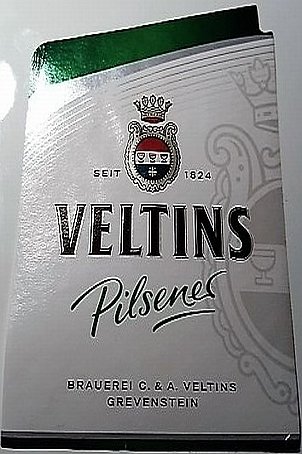
- Try to have a lot of light and avoid using the flash. Flash creates a glare as you can see of the top left side of that picture.
- Minimize borders as much as possible so the picture appearing on Colnect will not have redundant background.